How to create and use code snippets in VsCode
Let's check this unit test:
describe("MyAwesomeComponent", () => {
  it("should do something", () => {
    // ... some code here
  });

  it("should do something another", () => {
    // ... some code here
  });
});
So every time you need to write manually these describe(..., it(... boilerplate.
Quite annoying, right?
Snippets helps to avoid this routine and concentrate on writing code.
So let's begin.
To create your own snippet open Command palette (Menu View - Command palette... or using key combination Ctrl + Shift + p) and open there Preferences: Configure user snippets. Now you can select for which filetype (or global) you want to create. I will create for Typescript:

Now in opened file you should be able to insert your custom snippets. Let's create one for adding it(... code block:
"Add test method": {
  "prefix": "it",
  "body": ["it('$1', () => {", "  $2", "});"],
  "description": "Adds test method"
}
where:
- Add test method means the description of your snippet
- prefix is what you will type in editor to execute snippet
-
body is actual body of code. It is array, where each element means line of code:
- \$1 and \$2 are placeholders where will be cursor placed after selecting snippet. Can jump between using
TabandShift+Tabkey combinations.
- \$1 and \$2 are placeholders where will be cursor placed after selecting snippet. Can jump between using
- description is what you will see in popup dialog as ...hm... description
Let's check how it is working:
-
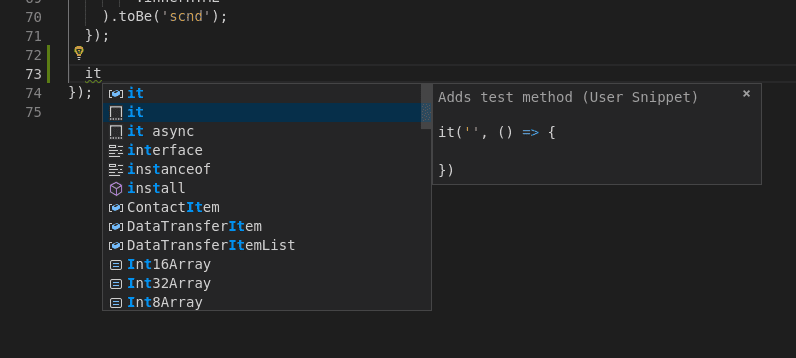
Somewhere in .ts file start typing
itand you will see a code complete popup:' width='796' height='358' xlink:href='data:image/png%3bbase64%2ciVBORw0KGgoAAAANSUhEUgAAAEAAAAAdCAYAAAAaeWr3AAAACXBIWXMAAC4jAAAuIwF4pT92AAAFp0lEQVRYw%2bVYaW/bRhD1tyRAgQTol9iSLIm3KIo6zUM8RFGnIycxeqBAgbb//1e8zoxMW7blQJbtRG4/PO9yTVK7b9%2b8meXR6ekpbNuGpmkol8vS1mo1gaqqqNfr0HUd/X4fruui1WyiYZqwLRPtloNWqwV%2bR6VSkfa14Ygn3m63YVkWSqXSFQFV%2bSePOY6D%2bXyO1WpFJAzQNHUEro1s4MJr2bCJEJMIYfJeJQH8p9Fo0MJ1WYSiqKjVdXS7XTRpccXOXrcbD1cqm/3KKybAasCyNZzWSjANFYnPpNiiACaFF/dfxRUBTbh9FYp1DJsk/imv4OPxsYREtcrhQKhWX2wXqi/47p0U0Gn30AtMaI2PZHq6hMBgMJDYZpaqLzyJInyYiIKMbf3Nsfv3PHzfNsILCAGu20FnYKGuHUNTdZiWgU7QobCgMc4G5A8CVXt%2bkOla5EGccapVzj716%2bxzt79ua%2bRTioDHHrqHW/az9e%2bot3CLAGafzc40TJycnIghRlFETNF4q43J5V/Qhueo%2bQtYah2mrsHUngHyHhWWoSMbjeB5PkajDHGc0HwcuR4OI0qzLqnxjOYUyzWj2yXF9vrSD4KQMlULZ2eeXK%2bfGwr4WTZ3XTcIptxrGOYtwxYFMAGc69nwivzPslfaAYLxJ/yc/Imfwj/wwY7xwRnhQzMVvH8C1s8n8r5e/lkWxQvlhVlkyu12516fW0nFRBAvmscYpmmRittSq/A7PM9Dp9MRIy8I4Jbv4/5mZhMF8K4XBBTuWCqdoN4l1kdzvB/9gzfR33jrTPDGmQretmZ4587xrrUn6Nm30i7QXfwuk2OzrdcVmaykY5G3BoXGWNJ1aZXr8OF7GMX9BfieYrxY/I0SjPsKKBa%2baRTlcglNx0WSjKFEFzjuTRF6Z5jOlxjnEwxIcnVFg0bS0vhH9oZJu9UTeWbZGB6Zr03plwnx/UDqkUbHJ3hizJu7ugs2SdhKwObFZp9ToEsxlMQpDC%2bHFUzR8SJMxmMaS%2bBTrNl2UypHVo%2bu7QH9Zme4pOaY5QVynDIBNkldrilNMxy65vHHEHCXiK0K2AY2RI7LOe24FUzgJkv0kjlC3yOjSmW3%2bP8sRf0pCqCJcZzzogv5F%2bB3r/uaoLh%2b7OL3J6BHBCwW0MIl0nSERrREMj1HQlkipzCYzWayQwUJ%2b07MMAxxcQYTsUnCDYwHxnfHowhYh0AbebqAPsjghxEaXoZolCPwfXFjhyRr3GF3PwJMURM7OfdfClzYbU2D28AmaFsOxj0iIDxHlKQwyQeibIYeGRPvGqdKduoiBLbJbRcCOK65KJGq80419xLYjQBSABdCyfI3hGFI2SBFGscU/zH8YIhK8it62YqKmBQqpRxdVW/F6K4kFAooJvY9sGn431YApUE/WyKiCos9YEjV2Gw2h%2beHMP0cYb7EKImhOWSGTl9cvCg2dlXDXQK%2bxwHoUQoYzr6K4/PCWQVcbrIKJtkIozQlQxzCTi9QTy6xuvgsVRqHxd1C5JAIuHcafJAAUgCXwmOq1aeTCeX/eK0EqrMlJKh2H8VkjskFavFXLBbLdY1ABQwTdagKeBQBYf4JIVWD8XiGIKIdTxKp2vjQEoRDDChVmoMUSp8yBI2FPEb1OGMXHzhYAjgN8oEjyxcwohUa8Tnc4QSXXz4jpN1lY5xOpjJ5lQ5QulIcR5XrmnxbHf56FEDnA9t2KP%2bnVAAt0IqX6MZTLGZT2Xne6fE4v/6eyMfNp9QBB0hASQwtobzP%2bb8Z5OiGmfgBxzgXQuwHXMbelKz74WBDoEVZYDxboUku38m/IDn/BavzpSx%2btbqQszgvnlPfUyo0JvHgCODJ8GcnnpxC8lauPovxCW49bkk1WHx%2beip%2b1Kf1o28VCpVKWZRQ4e8FhPIV1h9MSs/%2byfxHkHC0S7X0vXBQIfB/wb9JgUIPxpqhAwAAAABJRU5ErkJggg==' /%3e%3c/svg%3e)
-
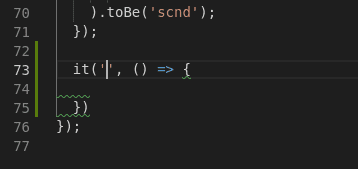
select it and vscode will put generated block of code and set cursor to that place where was first placeholder (
$1) defined:' width='358' height='169' xlink:href='data:image/png%3bbase64%2ciVBORw0KGgoAAAANSUhEUgAAAEAAAAAeCAYAAACc7RhZAAAACXBIWXMAAC4jAAAuIwF4pT92AAAFHElEQVRYw%2bVZ2VLjRhSdL0hVZhhAq2VZljfJC14x3sFgGBimnEklmUceUsUL//920qdF2xI2MKkKpuw8XLotdbf6Lufc280Hy7Jg2zbY6rouxTRN%2bUw9dxwHQRDAMAzZz2QyUPPS6fTieXyNuPA935lCDLG2Et2IRBPvTdOKxojnStT31V7eQj7wDz/meR7q9Tqq1Sqy2WxiA88ZgModHR0hDEPs7e1hNBqh1WrJ37e3tzg7O5N9rlupVBD6HsK8j9Jj2wgKCHJZjJsVdKsB8tkM2p0OXNeV8tbKJwxApQaDAa6vr9FoNKRyLxmA7zRNQ7vdRr/fRyqVwunpKS4vL3F3d4f7%2b3s8PDzI/sXFhTSCIdY87xzhx7Qn26tuA3%2bdneDv6wlaYVF%2b6/z8fOEItYc3N4BSkuFcLBZlNLwUARS%2b5wZLpZIcn8vlZEuPU6gAW87ju0KhgENNR0F4WUaA8Hwu48IXUivm4AgD8ntcj8J98HsbMwCV931ftvwd5wYqzE0pbNZqNTlWbTKO3XX4j2N6gX/5LJqnP65h29bK%2bI1ywMnJicQwPWaaxooB2D84OMBwOJRCzNPL9G6cOJ%2bT15Sx/uX4/5wD6FHiLwhK0A6FAaxVAxD3VL7ZbMqxbMvl8rN4jSvxkkLr3m3MAOpDDD%2bSmWnaCFsaHNeSYRqHAMfxt5qXesTuJjb7phHA1Hd8fCzSmsB3toDuzUdkcgKLxpIE47iMc8S2Kr/CAQznXq%2bHYiFEeyYM4FsLAzACFOGtM4AiQhJZ/Nl6sX9izGYkAQEZCX4Wlumge70nDLCMAJJdPPwVZFQ/JZ57IoqoHMcQGgoeSuRzjrUJneU4xTNqziZlEQFkfhY11WoFaSeD4y%2bfEgYg0SmFVK5nwURoMDo69Rp%2b/PEdGYdjUou6gkTJtEmCtYWirucLaBWRdjNiTLQeCzCmVa6v6oxNScIArOJubq4x6I/RmP4CLxdBIJ2OIoDj9vf3MZvNMJ1OMZ/PMR6PpRGqInP8Pv8G29AlnFj1USlWhyyX%2b0LJz58%2boti9QDj5jvL0T6QyvjTK/HYuou4dIaBIkIqwFgiDKtqXSQ5gBKixHVGv07Oq4qN3c/k8br5%2blemQRlEHJUYJI0CmUTFXRUAmVxLVn4CTY2P22wx%2bwZdpd9NQSHAAW0N4UDs0BQd8XuEATqBSNMJT9o/K4CCBd8UXCjqOk5bYlxwghOWv67vwqh7crCsN8m4QYLgyA/R6J1EWuPx1NQvohgxVekpJPAM8zRIvZ4HHuSyHdfP9IUAPMpzH4xEq5Rpas6QBgnIgwzXlCm%2bmo1b2tzT/P1sJatqh8IidgABDuDqowm/7yHXEya5bgN%2bK%2bo7nRFGxK4VQs9UU%2bHRFGkzWARGJibPAoYZutyuJrdVsbXUVuHIYIrszJ4dBZYUDgmIAS/T39/Yx7A8x6A0wGU2EsUQhY1vbDwGyO6%2bheLR10x46s1gECAiU2iV4dQ9OxUHvSw%2b1YQ31SV3ygSTEbTeAuupSl5vpjKjrU8sSudFtoFgtImyEsDwx3hf52hdEmE7tzmFoMpng6upK4l3XjUUO5yUIQ37QH2A8GqMclJHP5aFr%2bsL7W38cZvizEiTByfs/c3nQ4SWIui1SlyCBKHriF6dbDwF1Klsea5MVIg2kjBW/ENmJOkCdBZgF6GV1A/z0qLzuEmSn0iBzO6vB6FLUfPVubmciQGUBSvw/Mrug4KsGWHe19X9RfuUssGvh/TPyD3ZKWFEik/oCAAAAAElFTkSuQmCC' /%3e%3c/svg%3e)
Now you can create your own snippets and increase your productivity.
For more information visit official guide: https://code.visualstudio.com/docs/editor/userdefinedsnippets